



Graphing Linear Equations: T-Charts
Purplemath
Graphing linear equations is pretty simple. However, the only way to reliably and consistently draw good graphs is to do your work neatly. If you're messy, you'll often make extra work for yourself, and you'll frequently get the wrong answer.
(And, yes, "neatly" means "use a ruler to draw the straight lines"!)
I'll walk you through a few examples. Follow my pattern, and you should do fine.
The first step in graphing is to find some points to plot. The best way I've seen to keep track of these points is in something called a T-chart.
What is a T-chart?
A T-chart is a table of x- and y-values for a given equation (that is, for a given formula). Chosen x-values are recorded in the left-hand column and plugged into that equation; the corresponding y-values are recorded in the right-hand column, in the same row as its x-value input.
How do you make a T-chart?
To make a T-chart, draw an horizontal line; then draw a vertical line down from the horizontal line. Above the left-hand side of the horizontal line, write x; above the other side, write the equation you'll be graphing (or just write y).
Why is it called a T-chart?
The T-chart gets its name due to its shape. Across the top is the header bar with the columns' labels (usually x and y), with a line down the middle separating the two columns.
How do you use a T-chart?
The T-chart is a tool for keeping track of the x-values you've picked and plugged into an equation (that is, into a formula), and the corresponding y-values that you got from the equation. You'll use the T-chart to hold the points that you'll then plot for your graph. And showing a T-chart in your hand-in work also allows the grader to see where your points came from.
This page will explain and illustrate how to draw and fill a T-chart for a linear equation.
-
Graph y = 2x + 3. Show all work.
They've given me an equation to graph. I've learned about the x, y-plane, so I know what the graphing area is going to look like: I'll have a horizontal x-axis and a vertical y-axis, with scales for each (that is, with tick-marks and numbers counting off the units on each). But, to do the graph of this line, I need to know some points on the line. So my first step will be drawing a T-chart.
The T-chart is a table that charts (that is, that keeps track of) the values for my graph. It starts out empty, and generally looks something like this:
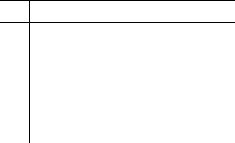
The left column will contain the x-values that I will pick, and the right column will contain the corresponding y-values that I will compute. To show this, I label the two columns:
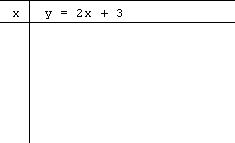
(Most people just put " y " as the header for the right-hand column. I like to put the equation in the header, too, so I don't have to keep looking back at the exercise statement while I'm doing my computations.)
The first column (on the left) will be where I write my input values (that is, where I'll list my chosen x-values); the second column (on the right) is where I will write the resulting output values (that is, where I'll list the corresponding y-values).
Together, these pairs of x- and y-values make points, (x, y). These will be the points that I'll plot to locate the line and draw my graph.
(Most people just put "y" above the right-hand column, rather than writing out the equation. I'm including the equation for clarity's sake, and so I don't have to keep checking back in the book for what the homework question says.)
Why is the right-hand column (the one for the output-, or y-, values) so much wider than the column for the input-, or x-, values? Because I'll be picking the x-values, so I only need enough room to write them in the chart. But I'll be doing evaluation and simplification to find the corresponding y-values, so I'll need more room, especially since (as in this case) I have to show all of my work. If I didn't have to show all my work, I might use scratch paper to find the outputs, and write only the final y-values in the chart. That's not an option this time. So:
I need to pick some values for x. I only technically need two points to "determine" a line (that is, to locate where the line is going to be graphed). But it's generally better to pick at least three points, to verify (when I'm graphing) that I'm getting a straight line. ("Linear" equations, the ones with just an x and a y, with no squared variables or square-rooted variables or any other fancy stuff, always graph as straight lines. That's where the name "linear" came from.) If I plot three points and they don't line up as a straight line, this tells me that I've made a mistake on at least one of the points, and I need to go back and check my work.
Now that I have a T-chart, I need to fill it. Which x-values should I pick?
How do I know what to pick for x?
There is no rule or set requirement regarding the x-values that you pick for your T-chart. While some x-values may be more useful than others (for instance, by fitting better within the graphing area or being relatively close to the origin), the actual choice is yours to make.
Verdict: The choice of x's is actually entirely up to me! And it's perfectly okay if I pick values that are different from the book's choices, or different from my study partner's choices, or different from the instructor's choices. Some values may be more useful or easy than others, but the choice is completely mine.
So my method for filling the left-hand column will be: I'll pick some x's that are close-ish to zero, and that include at least one negative value, for a nice spread of points.
What about the right-hand column? I'll find the y-values for each x-value I pick by evaluating the equation at that x-value, and simplifying. (In other words, I'll plug my x-values into the formula they've given me, and I'll do the computations to figure out what y-value goes with that x-value.) And my T-chart will keep the information all nice and neat.
I'll pick the following x-values:

I could have picked other values, such as 0, 1, and 2, but I've learned that it's often better to space my input values out a bit, if it's possible to do so. It spreads my points out within the graphing area, so I can more easily line up my ruler against the points and then draw my line. (That's not a rule, but it's a method that can be *so* helpful, especially if I made a mistake with one of my points so it's out of line with the others.)
Now that I've picked my x-values, I have to compute the corresponding y-values:
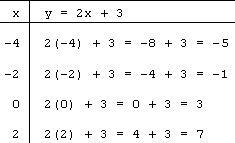
This finishes my T-chart. Next, I'll need to draw my graphing area and plot my points. Then I can draw my line (which we'll do on the next page).

On a side note, some people like to add a third column to their T-charts to give room for a clear listing of the points that they've found. It's uncommon to do so, but not "wrong" and it could be helpful, at least when you're starting out. A three-column T-chart for the above equation and values would look like this:
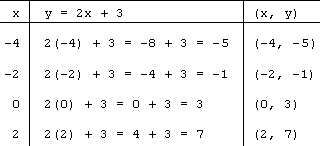
Which format you use is (usually) just a matter of taste. Unless your instructor specifies, either format — two-column or three-column — should be fine.
How do you solve T-charts?
There is no "solving" of T-charts; they are just tables that you've filled with x-values that you've picked and corresponding y-values that you've computed. Then you take the x,y pairs (that is, the points) and you plot those pairs to create a graph.
© 2024 Purplemath, Inc. All right reserved. Web Design by 