



Formatting Math as Text: Common Algebra-Related Notation
Purplemath
Math can look so pretty when it's all nicely formatted in a textbook. But when you go to e-mail your instructor with a question, or post your question to a math help forum, you can end up with a mess or with something that totally doesn't mean what you meant to say.
To deal with this issue, the math community has developed norms for text-only formatting. What follows is not the one and only "right" way to format math; instead, it is a distillation of what I've seen a lot of math folks use.
In what follows, I've provided an example of a nicely-formatted math expression, the typed-text-only version, and notes on the formatting for the operation or character in question.
(Much of this formatting is mirrored in the formatting for entering things into a graphing calculator. For instance, whether typing in a forum posting or entering something into your calculator, you'll use the carat symbol [^] to indicate an exponent.)
| Type-set formatting | Text-only formatting | Notes |
|---|---|---|
| 4 ÷ 2 | 4/2 4 ÷ 2 |
The "slash" is commonly used to indicate division or fractions, but you can also insert the "divided by" sign (on a PC) by holding down the "ALT" key and typing "0247" on the numeric keypad. |
| 4 × 2 | 4 * 2 4 × 2 (4)(2) |
The asterisk is commonly used to indicate multiplication, but you can insert the "times" sign (on a PC) by holding down the "ALT" key and typing "0215" on the numeric keypad. |
 |
(1/2)x + 5 | If you forget the parentheses around the "one-half", it will be unclear whether or not the variable is meant to be included in the denominator. Some will assume that you meant or even |
 |
1/(2x) + 5 | The variable isn't often in the denominator like this, so use parentheses to make it clear where the variable belongs. |
 |
1/(2x + 5) | The parentheses make it clear that the "five" is included in the denominator. |
 |
If you don't use the parentheses, it would not be clear that the first "x" belongs inside the numerator, or that the "5x + 6" belongs inside the denominator. | |
| (x + 2)/(x^2 + 5x + 6) | ||
![[(x + 3)/5] / [(x - 4)/2]](format/format13.gif) |
Use different grouping symbols to demark the two fractions within the complex fraction. Using extra spaces is helpful, too. | |
| [(x + 3)/5] / [(x - 4)/2] | ||
| x2 | x^2 | The carat key, usually "shift-6" on the keyboard, is customarily used to indicate exponents. If you have a graphing calculator, this is the same character as your calculator uses for powers. |
 |
x^(2/3) | If you don't include the parentheses, it will look like you mean "x squared, divided by three", or . |
| 23x | 2^(3x) | If you don't use the parentheses, it will look like you mean "two cubed, times x", or 23x, when you actually mean the variable to be in the exponent. |
| x2y3z4 | x^2 y^3 z^4 | Use spacing to make clear where one factor (and its exponent) ends and the next begins. Otherwise, the viewer may wonder if x^2y^3z^4 might mean something like x2y3z4. |
| f −1(x) | f^(-1)(x) | Yes, this is clunky notation, but the tutors will understand that you mean "f-inverse of x." |
 |
(f o g)(x) f(g(x)) |
Either use a lower-case letter O to indicate function composition, spacing things out so it doesn't look like you're trying to spell "fog", or else switch from "f-compose-g of x" notation to "f of g of x" notation. |
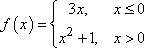 |
Piecewise functions are one of the few items for which multi-line formatting is pretty-much inescapable. Just do the best you can, and preface whatever you post by telling the reader that what follows is meant to indicate a piecewise function. You might even just type out the cases as "f (x) is equal to 3x for x less than or equal to zero, and is equal to x2 + 1 for x greater than zero." | |
(3x, x <= 0 |
||
| ⌊ x ⌋ | floor(x) | The "floor" function is a named function. Type out its name, and put its argument inside parentheses, following the patter of function notation. |
| ⌈ x ⌉ | ceil(x) ceiling(x) |
The "ceiling" function is a named function. Spell out that name. |
 |
sqrt(2y) | The abbreviation "sqrt" stands for "the square root of", and the parentheses make it clear that both the "2" and the "y" belong inside the radical. |
 |
cbrt(7)x cbrt(7)*x |
The abbreviation "cbrt" stands for "the cube root of", and the parentheses make it clear that the "7" is inside the radical, but the "x" is not. If you type cbrt7x, it will be assumed that the x is inside the radical, too. |
 |
5th-rt(z) | For larger-index roots, give the value of the index, and explain your notation. In this case, you would say "I'm using '5th-rt(z)' to stand for 'the fifth root of z'." |
| ≥ | >= | Write out "greater than or equal to" just as you say it: a "greater than" sign followed by an "equals" sign. |
| ≤ | <= | Write out "less than or equal to" just as you say it: a "less than" sign followed by an "equals" sign. |
| ≈ | ~ = (approx) |
The "wiggly equals" means "approximately equal to", and indicates that you've rounded. You can either use the tilde (the single wiggly line, probably close to the "ESC" key on your keyboard) or a regular "equals" sign followed by the notation "(approx)", indicating that the answer is an approximate value. If you use the tilde, say what you mean by it. |
| ≠ | != =/= <> |
The exclamation mark is commonly used in computer programming to mean "not", so "!=" means "not equal". But the "equals-slash-equals" sequence more closely simulates the "not equal to" symbol. The "less than, greater than" sign is also sometimes used, but not so commonly. Whichever you use, define in your post what you mean by the notation. |
| ± | +/- ± |
You can use "+/–", or you can enter the character directly (on a PC) by holding down the "ALT" key and typing "0177" on the numeric keypad. |
| x2 | x_2 x_[2] |
Subscripting doesn't come up much, and it's a pain when it does. Many people just put the subscript after the variable, but this can be confused with superscripting. So, to be clear that the 2 goes below the baseline of the x, use the underscore. If you're dealing with very complicated expressions, you might want to use the grouping symbols after the underscore. |
| log2(5) | log_2(5) | Use the underscore to indicate the base, and use parentheses to make clear what is inside the log. |
| ln(x) | ln(x) | Do not use a capital "I" for the natural log. The notation is "LN" (ell-enn, but in lower-case), not "IN" (eye-enn). And don't forget your parentheses around the argument (the insides) of the log. |
| log(y) | log_2(y) log_10(y) log_e(y) |
If you use just plain "log(y)", the base will be unclear. Either use the underscore notation to state the base, or else define yourself. Depending on the context, a plain "log", without a base noted, will be assumed to have a base of 2, of 10, or even of e, depending upon the reader's context. Don't assume the tutor knows which one you mean. |
| log2(4) | log^2(4) [log(4)]^2 |
The square can go right on the function, but this can sometimes get a bit confusing, especially if your log has a base notation on it. In messy cases, put the exponent outside the function, using brackets (so the power goes on the log, and not just the log's argument). |
| |–6| | |-6| abs(-6) |
You can use "abs()" to indicate absolute value (or "modulus"). But you should be able to enter the absolute bars into your post by using the "pipe" character. Look for a key somewhere above the "Enter" key with a shift character that's a vertical line. (The line may have a slight gap in the middle. Don't worry; it'll type as a solid line.) |
| 0.3333... 1.6272727... |
The repeated digits in a repeating decimal can be indicated by showing a few repeats, and then appending the "dot, dot, dot", which means "continuing onward in like fashion". | |

If you must use multi-line formatting (rather than the single-line formatting demonstrated above), then use especial care in formatting. (This would apply to such things as polynomial long division or synthetic division.) If you're e-mailing your question, then compose the post using a fixed-width font such as Courier, and warn the recipient that he'll need to view the post in a fixed-width font. If you're posting to a message board, use "PRE" tags, if allowed, or else format using the "CODE" tags (or something similar). And remember to "Preview" your post before actually posting it to the message board, so you can make sure that your post clearly says what you mean it to say.
Use standard abbreviations, or none at all. For instance, "m" means "meters" (though it could also, depending on the context, mean "slope"); if you mean "miles", use "mi". If you're not sure of the abbreviation, spell it out; if you want to invent your own abbreviation, that's fine, but define yourself clearly. For instance, if you're working with rational expressions, don't just say "i cant find HA"; instead, say "I'm having trouble finding the horizontal asymptote (HA)".
One note on variables: Don't change the case in the middle of your post. In math, an upper-case "X" and a lower-case "x" are not the same thing. If you change, willy-nilly, back and forth between cases, you'll have the tutor wondering if you really mean two different variables. If you mean only one variable, then use only one name for it.
© 2024 Purplemath, Inc. All right reserved. Web Design by 